The 5 Best Wand Scanners
Updated by · How we research

Four hand-swept wand scanners and a sheet-fed stick compared on steadiness, memory cards and warranty. The MUNBYN IDS001 is our pick for quick document grabs. When users buy our independently chosen editorial picks, we may earn commissions to help fund the Wiki.
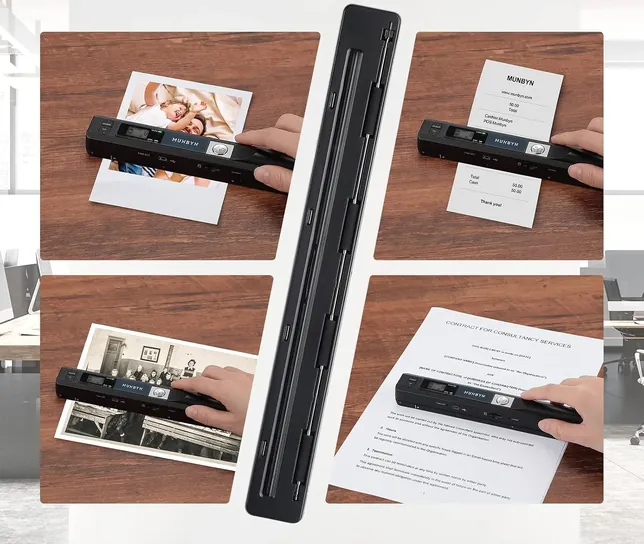
A wand scanner records only what passes under it as you sweep, so your hand sets the quality: rush it and lines stretch or bend. That makes these slim, battery-powered bars good for receipts, recipes and book pages on the go, and a poor choice for archiving family photos, where a flatbed or a careful phone shot does better.


Editor's Notes
October 26, 2026, by Ezvid Wiki Editors:
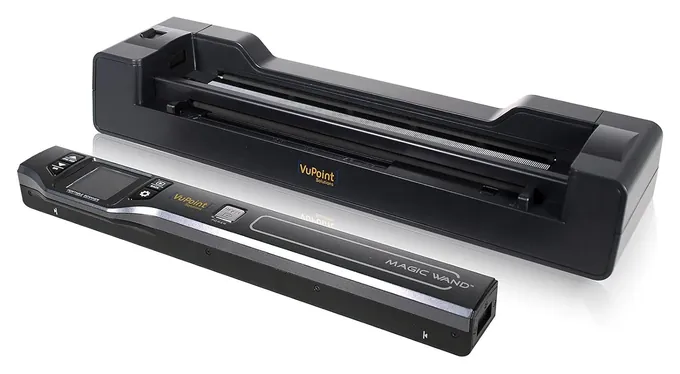
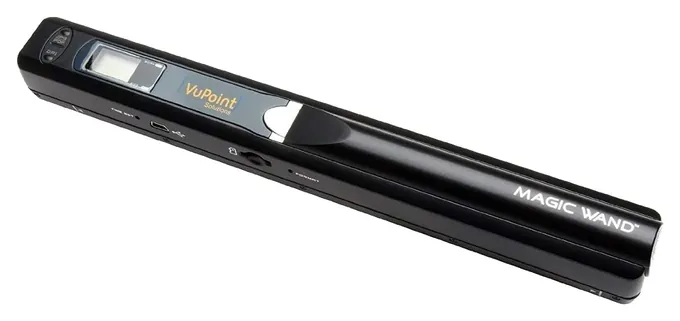
We put the MUNBYN IDS001 first because more people buy it than any other wand we found, it comes with a memory card, and its warranty runs two years. Six of the eight earlier picks have vanished: the Iriscan Book 5, Adesso EZScan 310, Pandigital Handheld Wi-Fi and Home Zone EZscan1000 can't be bought new, and both Aibecy iScan models have disappeared. The VuPoint Magic Wand ST470 and VuPoint Magic Wand ST415 stay, though few units are left.
This page sticks to scanners you sweep by hand, plus the Epson WorkForce ES-50 for anyone who wants straight scans without the wobble. For desktop, duplex and photo scanners, see our scanners list, and for pens that read a line at a time, see pen scanners. Most cheap wands sold today are one design under many brand names, so we kept two and left the rest out.
No lab has published a test of wand scanners. We worked from VuPoint's box spec panels, Epson's spec sheet, TechGearLab's comparison of portable sheet-fed models, and the problems owners keep raising, like stretched lines from a rushed sweep and units that switch off mid-page.
Earlier notes
December 24, 2020, by Chris Gillespie:
Improvements in digital technology are seeing these handheld scanners move to 1200 DPI as an industry standard. This along with Wi-Fi connectivity, multi-format conversions, and downloadable apps for Android and iOS are making them more versatile and easier to use.
We replaced the Adesso EZScan 300 with the improved Adesso EZScan 310, which now has a full-color screen, a high resolution of 1200 DPI, and allows images to be sent directly to your phone or tablet.
We also added the Home Zone Ezscan1000 which comes with a docking station that gives it an auto-feed function, however, both the wand and the dock require batteries which may discourage some users. The Iriscan Book 5, on the other hand, has a built-in rechargeable battery and plenty of options for transferring files, thanks to its Wi-Fi connectivity and a proprietary app.
September 5, 2019, by Daniel Imperiale:
If you've ever run a flatbed scanner or copier without its lid in place and watched as the long, thin line of the optical relay slid beneath the glass, then you know more or less how a wand scanner works. With a wand, however, the relay is in your hand. In many ways, any of the features that could distinguish a flatbed model are used to differentiate among portable options, with added scrutiny on things like weight and battery life. That's because these things are meant to be taken with you, meant to be used in the field for scanning a variety of things.
Since the flatbed scanner places its optical relay on a track, and since human hands aren't quite as steady as their mechanical counterparts, wand scanners often require that their users move very slowly and very precisely to help create viable scans. If you have limited time with a document, that can mean you get home, transfer your files to a computer, and find that they're useless. That's why we gave so much priority the VuPoint model at number one, which features a reliable preview screen to ensure you get it right before you save and move on.
The other important factor that put the VuPoint model at number one, and along which lines you can almost draw a perfect arc through our list, is resolution, measured in dots per inch. The higher the DPI, the better an image can resolve, but also the larger the files it creates. That's why most of these products let you select from one of several resolutions, but with its top resolution reaching 1200 DPI, that VuPoint model proved unbeatable.
Special Honors
IRIScan Book 7 by IRIS IRIS, a Canon company, made the IRIScan Book 5, one of the best-known wands of its time, and now sells the IRIScan Book 7 through its own store. It's worth a look if you want a wand from an established scanner maker. Check its computer support before buying: Digital Camera World found the Book 5's software needed registration and didn't support Macs. irislink.com
Your Hand Is The Paper Feed
The 900 dpi on most boxes is a top setting, not a sign of better results.
A wand has a strip of sensors along its underside and no motor. It records the page line by line as you slide it, so the speed and straightness of your sweep become part of the image. Go too fast and letters stretch or the scan breaks up into bands; drift sideways and lines bend. Most wands also stop recording if you pause mid-page, so one smooth pass works best. Digital Camera World found that even the well-regarded IRIScan Book 5 took practice to get clean results (Digital Camera World).
The 900 dpi on most boxes is a top setting, not a sign of better results. For letters, receipts and recipes, 300 or 600 dpi is plenty and keeps files small. Flat pages work well. Pages that curve into a book's spine, thick card stock and tiny items like business cards are harder, because the wand can't stay flat on them. For archiving old prints, a flatbed scanner gives far more even color and detail.
Wand, Dock Or Feed Slot
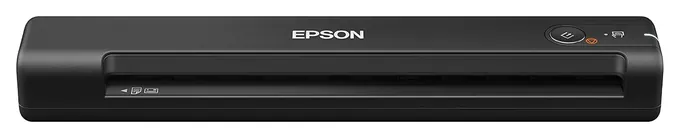
If wobbly scans bother you, take your hand out of the loop. VuPoint's dock holds the wand still and pulls a loose sheet past it, and you can still lift the wand out for a book. A stick-shaped sheet-fed scanner goes one step further. Epson's WorkForce ES-50 pulls each page through its slot at about 5.5 seconds a page, takes sheets up to 72 inches long, and runs on power from a computer's USB port (Epson). The catch is that it needs that computer for every scan.
TechGearLab's scanner comparison, which covers portable and desktop models but no wands, scores the ES-50 as good enough for most people's needs (TechGearLab). If you scan stacks of paper at home rather than single pages on the road, a desktop model with a document feeder from our scanners list will save hours.
Cards, Batteries And Searchable Text
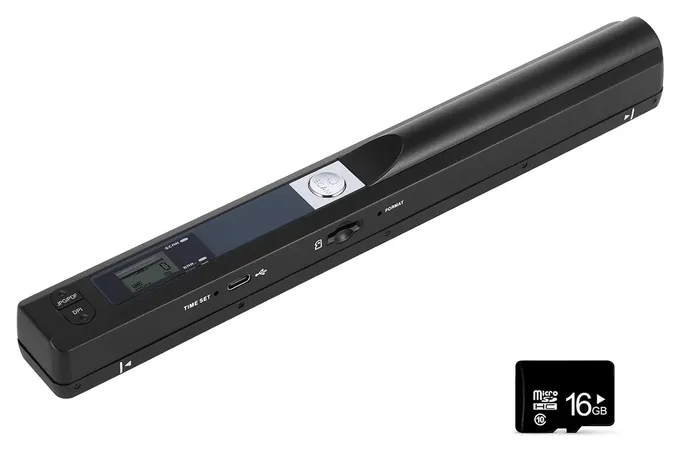
Most wands save straight to a microSD card, so they work with no computer nearby. Check whether a card comes in the box: some wands include a 16 GB card, others leave it to you, and most top out at 32 GB. Budget wands and the VuPoint ST415 run on two AA batteries. Fresh alkaline cells give the steadiest results, and taking them out before storage avoids leaks. The VuPoint ST470 has a rechargeable battery instead.
A PDF from a wand is a picture of the page, not text you can search or edit. Turning it into text needs character-recognition software, and the bonus software VuPoint bundles runs only on Windows. Scans of bank statements, IDs and medical papers sit unencrypted on that card, so wipe it or keep it somewhere safe. No recalls turned up for MUNBYN, VuPoint, ANNCARY or the ES-50 in the federal recall database (SaferProducts.gov).
How we researched this
We compared 16 handheld and portable scanners, read makers' spec sheets and box panels for the 5 finalists, used TechGearLab's comparison for the sheet-fed pick, analyzed patterns in owner feedback, and checked every brand against U.S. recall records. No lab has published a test of wand scanners.
Frequently asked questions
Are wand scanners any good?
They're good for quick copies of receipts, letters, recipes and flat book pages, especially away from a desk. They're a poor fit for archiving photos, where a flatbed scanner gives more even results.
Do wand scanners need a computer?
No. Most save JPG or PDF files to a microSD card as you scan. You plug the wand into a computer with a USB cable only to copy the files off. The Epson WorkForce ES-50, a sheet-fed stick, is the exception: it needs a computer for every scan.
Can a wand scanner scan a book?
Yes, for pages that lie flat. Text near a tight spine curves away from the sensor and comes out warped, and thick pages are hard to sweep evenly.
Can a wand scanner make searchable or editable text?
Not by itself. The PDF it saves is an image of the page. You need character-recognition software to turn it into text, and VuPoint's bundled software runs only on Windows.
Why does a search for wand scanners show metal detectors?
"Wand scanner" also means the handheld metal detectors used at security checkpoints, and some barcode readers. This page covers only wands that scan paper.