The 9 Best Keyboards For Left Handed Users
Updated by · How we research

Nine keyboards and keypads for left-handers, compared by number-pad side, wireless, switches and desk space. The RK Royal Kludge L98 is the best southpaw. When users buy our independently chosen editorial picks, we may earn commissions to help fund the Wiki.
No keyboard mirrors the letters for left-handers: the alphabet stays put, and only the number pad can move to the left. That swap helps people who enter figures with the left hand or work a mouse with the right. A left-handed mouser who rarely types numbers often does better with a short board, and gamers can add a one-handed keypad.


From the manual
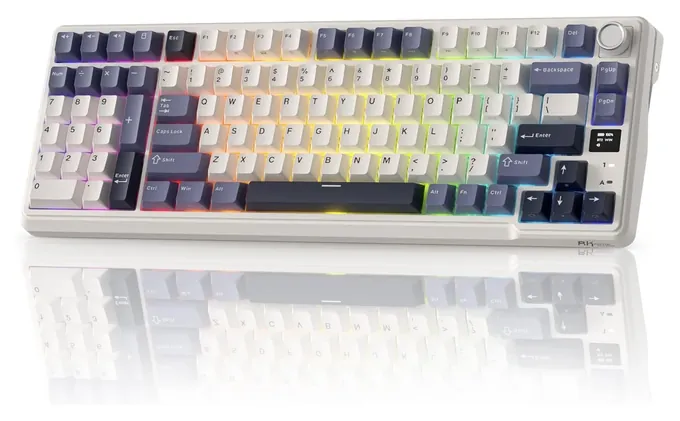
- The 2.4 GHz dongle comes paired at the factory, so the wireless mode works as soon as the receiver is plugged in. 2.4G connection
- Bluetooth holds three devices on Fn+Q, W and E: a long press pairs, a short press reconnects, and the board appears as RK L98. BT connection
- Fn+S switches the top-row shortcuts to their Mac functions, and Fn+A switches back to Windows. Key combinations
- The volume knob pulls out of its socket and can be replaced with a plain Home key. Knob function
Why the RK Royal Kludge L98 is our top pick
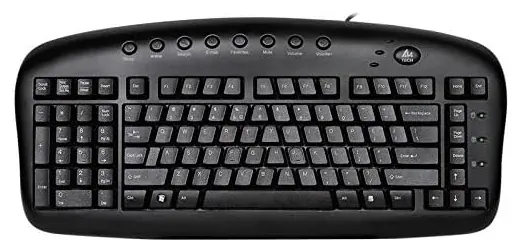
The L98 is the only full board here that puts the number pad on the left and still cuts the cord: it links by a 2.4 GHz dongle, Bluetooth or a USB-C cable.1 Our runner-up, the A4Tech KBS-29, has the same left-side pad but connects only by USB or PS/2 cable.4
The rest of the gap is features the KBS-29 lacks. The L98 has hot-swap sockets, so its switches pull out and change without solder, plus RGB lighting and a volume knob that can be swapped for a plain Home key.1,2 Its quick guide adds a Mac mode on Fn+S, though RK's spec table lists only Windows and Android.2,1 A4Tech lists Windows alone and no backlight.4
The runner-up still has real points in its favor. It never needs charging, its maker rates it splash-proof, and its keys sit in an angled A-shape meant to ease strain on the wrists and shoulders.4 The L98's battery is rated for up to 310 hours with the lights off but only 51 with the RGB on,1 and RK's own store gives a one-year warranty.3
| RK Royal Kludge L98 | A4Tech KBS-29 | |
|---|---|---|
| Connection | 2.4 GHz dongle, Bluetooth, USB-C | USB or PS/2 cable |
| Switches | Mechanical, hot-swap | Not stated by the maker |
| Backlight | RGB | None |
| Systems the maker lists | Windows, Android; Mac mode in guide | Windows XP to 10 |
| Power | Battery, up to 310 h unlit | Cable, no battery |
Sources
- RK Royal Kludge L98 1Product page and spec table 2Quick guide (Manuals+ copy), p. 1 3RK limited warranty
- A4Tech KBS-29 4Natural_A keyboard spec page
Compare the specs
Swipe the table sideways to see every column.
| Product | Number pad (position) | Connection | Keys (switch type) | Battery life (maker rating) | Systems listed (by the maker) |
|---|---|---|---|---|---|
| 1. RK Royal Kludge L98 | Left | Dongle, Bluetooth, USB-C | Mechanical, hot-swap | 310 h; 51 h with RGB | Windows, Android; Mac mode |
| 2. A4Tech KBS-29 | Left | USB or PS/2 cable | — | Wired, no battery | Windows |
| 3. Razer Tartarus V2 | None (keypad) | USB cable | Mecha-membrane | Wired, no battery | Windows 7 64-bit or later |
| 4. Redragon K585 | None (keypad) | Detachable USB-C cable | Mechanical (Outemu) | Wired, no battery | Windows |
| 5. Logitech MX Keys Mini | None | Bluetooth; receiver extra | Scissor | 10 days lit, 5 months unlit | Windows, macOS, Linux, more |
| 6. Keychron K0 Max | Separate pad, any side | Dongle, Bluetooth, USB-C | Low-profile mech, hot-swap | About 50 h with RGB | Windows, macOS, Linux |
| 7. Redragon K552 | None | USB cable | Mechanical (Outemu) | Wired, no battery | Windows |
| 8. Kinesis Freestyle2 | Fn layer, right half | USB cable | Membrane | Wired, no battery | Windows; Linux partly |
| 9. Logitech Ergo K860 | Right | Bluetooth or USB receiver | — | 2 AAA, up to 24 months | Windows, macOS, Linux, more |
Battery figures are the makers' ratings and vary with lighting and use; Keychron's 50 hours is with the lights at their lowest. A dash means the maker doesn't say.
Sources
- RK Royal Kludge L98 Product page and spec table Quick guide (Manuals+ copy)
- A4Tech KBS-29 Natural_A keyboard spec page
- Razer Tartarus V2 Master guide (PDF)
- Redragon K585 Product page Instruction sheet (PDF)
- Logitech MX Keys Mini Specifications Getting started
- Keychron K0 Max Product page and specs
- Redragon K552 Product page Instruction sheet (PDF)
- Kinesis Freestyle2 Freestyle2 for PC specs Getting started (manualsdir copy)
- Logitech Ergo K860 Getting started For Business data sheet (PDF)
From the manual
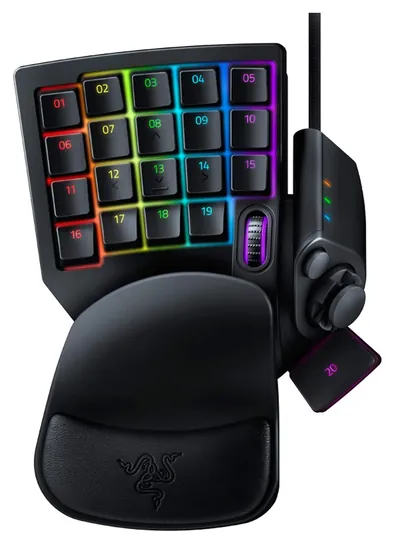
- Razer lists Windows 7 64-bit or later only, and remapping runs through its Synapse app, which asks you to log in with a Razer ID. pp. 3, 7
- The thumb stick pops off to leave a plain eight-way pad, and the palm rest lifts off to reattach in its other position. p. 9
- Holding the Hypershift key gives every key a second set of commands. p. 12
- Opening the case voids the warranty, and Razer says to keep the keypad away from liquid and humidity. p. 30
From the manual
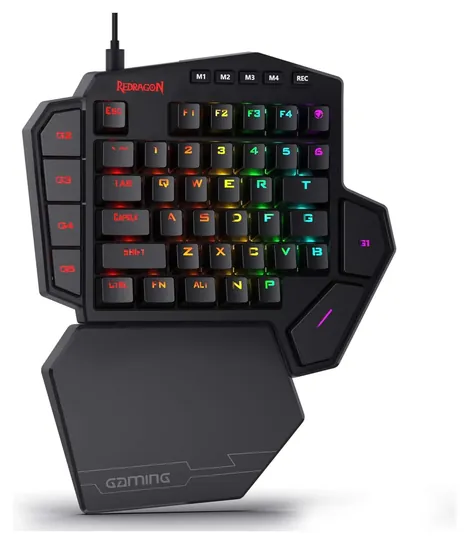
- To record a macro on the pad, press REC, pick a light mode and one of seven macro keys, type the keys, then press REC. p. 2
- Each macro belongs to the light mode it was recorded in, and plays back only in that mode. p. 2
- Holding Fn+Esc for three seconds restores factory settings, and Fn+Esc also erases every recorded macro. pp. 2-3
- The sheet lists Windows only, and the warranty excludes damage from taking it apart, hard knocks or water. pp. 1-2
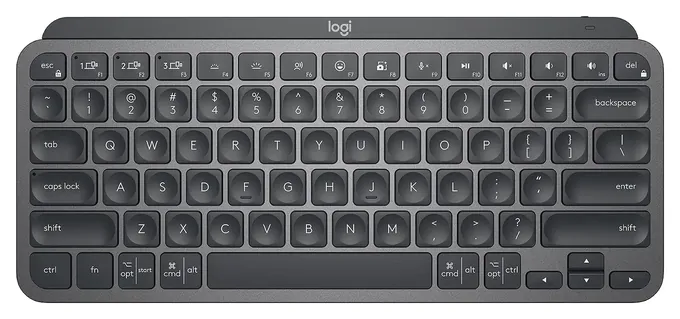
From the manual
- In a room brighter than about 100 lux the backlight turns itself off, and it can't be switched back on until the room is darker. Smart backlighting
- At 10% battery the backlight shuts off and stays off until you plug in the USB-C cable to charge. Low battery
- Fn+Esc swaps the top row between media keys, the default, and standard F-keys. F-keys switch
- On a Mac with FileVault on, Bluetooth may not connect at the login screen; Logitech advises buying its Bolt receiver. Manuals+ copy, p. 8
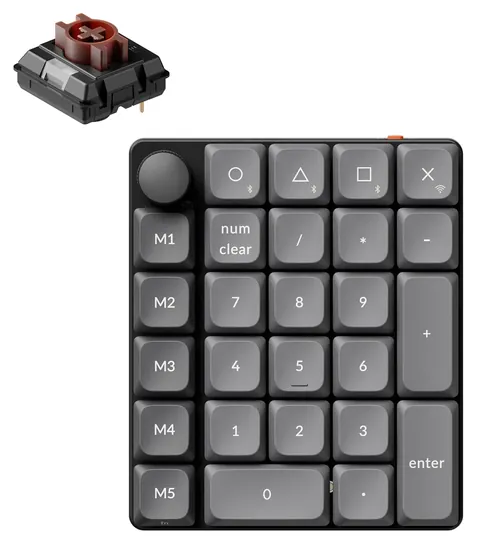
From the manual
- After 10 idle minutes the lights go off; after two hours it deep-sleeps and drops the wireless link until you press Fn or the knob. Battery saver
- Keychron suggests setting the 2.4 GHz receiver on the included extension adapter, close to the pad, for less lag. 2.4 GHz receiver
- Plugged in by cable it never enters battery-saver sleep. Wired mode
- Under warranty Keychron replaces only the faulty part, not the whole pad. Warranty
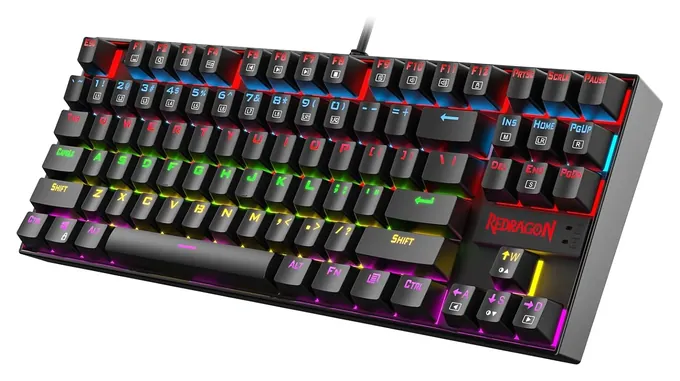
From the manual
- Fn+W swaps the WASD keys with the arrow keys, which helps a player who mouses on the left and moves with the right hand. p. 4
- Fn+Win turns off the Windows key, so a stray press won't drop you to the desktop mid-game. p. 4
- Fn+F12 locks the whole keyboard; press it again if the keys suddenly stop responding. p. 4
- It needs no driver or software, and the sheet lists Windows XP through 10. p. 2
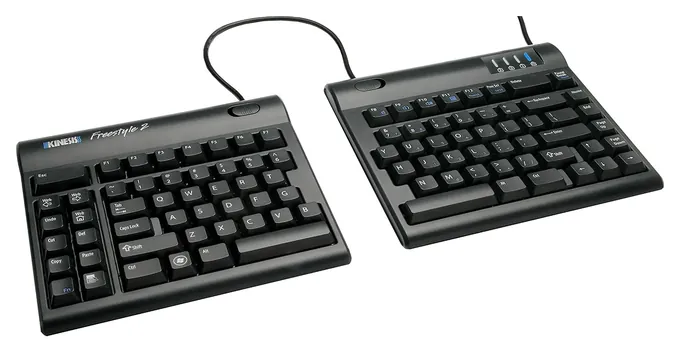
From the manual
- The number pad hides in the Fn layer of the right half, and NumLock (Fn+F12) must be on before it types digits. p. 1
- The Fn light also comes on while the computer sleeps, so it doesn't always mean the number layer is active. p. 1
- No driver is needed, but some hot keys work only under Windows; most also work on Linux. p. 1
- It runs as one piece on the pivot tether, or as two halves joined only by the link cable. p. 1
Kinesis Freestyle2 for PC getting started guide (manualsdir copy)
From the manual
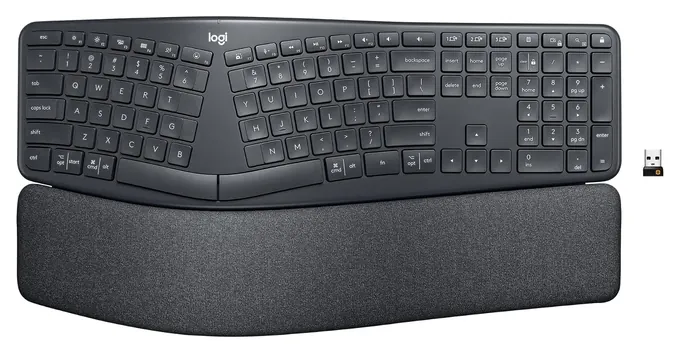
- The USB receiver stores inside the battery compartment on the back when you're not using it. Connecting
- Two AAA batteries run it for about two years, Logitech says, depending on use. Battery information
- Easy-Switch keys hold three computers: hold one for three seconds to pair, tap it to switch. Easy-Switch
- Two sets of palm-lift legs give three settings: flat, 4 degrees or 7 degrees. Palm lift
Editor's Notes
November 5, 2026, by Ezvid Wiki Editors:
This pass checked every pick against its maker's spec page and the manuals we could find, added a spec table, a section on why the L98 leads, and setup notes from eight manuals. We corrected the KBS-29's Mac claim (A4Tech lists Windows only), the Tartarus palm rest, the K552's metal plate and the K585's switch claims, and noted that Keychron's Q12 Max is a second wireless southpaw board.
October 23, 2026, by Ezvid Wiki Editors:
The RK Royal Kludge L98 is the new top pick, because it puts the number pad on the left of a current wireless mechanical board. [2026 update: Keychron's all-metal Q12 Max also does, at well over twice the price.] The A4Tech KBS-29 stays as the low-cost southpaw option, and the Kinesis Freestyle2 and Logitech Ergo K860 stay for people who mainly want comfort.
We also added gear for the other ways lefties work. The Razer Tartarus V2 and Redragon K585 give gamers a pad for the left hand, while the Logitech MX Keys Mini and Redragon K552 drop the number pad so a mouse fits close on either side. The Keychron K0 Max turns any short board into a southpaw setup.
The Drop Alt and Delux T9 are no longer sold, and the Evoluent R3K had no price or stock, so it moved to a special honor. The SteelSeries Apex Pro, Razer Ornata Bundle and Bloody B945 Light Strike were ordinary right-handed boards, so they're gone. Southpaw keyboards are a small niche that labs don't review, so we leaned on makers' layout drawings, battery ratings and warranty terms.
Earlier notes
September 17, 2020, by Max Karpecki:
There aren't a lot of products that are accommodating to people who are left handed, though we've listed some of the most high-quality keyboards that are comfortable for left-handed users. We've provided a variety of options that are suitable for gaming at home or for typing at the office. I recommend getting a left-handed mouse so you can have the most comfortable setup possible. Gamers who are looking to create a high-quality setup should look into a gaming computer which can handle playing and streaming high-resolution games.
It can be taxing on your posture and arms when typing for many hours a day. That's why I recommend getting an ergonomic model that can help relieve pressure on your wrists. The Kinesis Freestyle2 features two individual key modules that allow you to move each piece to your desired placement on your desk. They connect to one another via a nine-inch cable, though a twenty-inch option is available. Those looking for a one-piece model might appreciate the Logitech Ergo K860. It's a curved design with an adjustable palm rest and connects via Bluetooth or USB connectivity. [2026 update: the palm rest itself is fixed; the legs underneath adjust the tilt.] It's compatible with most Mac, Windows, and Linux Operating Systems, and has decent battery life.
Some people like to live in the realm of minimalism figuratively and literally, which is why we've included compact keyboards to accommodate those who like to have extra space on their desks. The RK Royal Kludge is a wireless selection that is available in a few different switches, which means you can decide if you like loud keys, such as blue switches, or a soft sound while typing, like cherry browns. It's also great if you need to take it on the go every now and then. [2026 update: that was an earlier compact RK model. The RK L98 on today's list is a 96% board with a number pad and RK's own Beige, Cream or Silent switches.] The Drop Alt is another great compact selection and has RGB lights underneath the keyboard. This model is much more expensive than the aforementioned, though it works well if you're an avid writer and enthusiastic gamer.
Speaking of gamers, if you need some of the best gaming accessories, the Razer Ornata Bundle is a great option for you. It comes with an ambidextrous mouse and a keyboard that can match your rainbow light strip in your bedroom, office, or streaming studio. It has a detachable wrist pad, which may help alleviate stress on your wrist, especially if you plan to game for many hours a day. A non-traditional option for some, but a great accessory for most, is the Delux T9. It's a single-handed keyboard that has programmable macros and can be added to your setup without having to splurge on a whole new keyboard. It allows you to use your left hand to move your mouse while having your right hand focused on charging towards enemies or planting tomato seeds in your virtual farming town.
Special Honors
Evoluent R3K Reduced Reach Keyboard Evoluent, best known for its vertical mice, makes a full-size keyboard with the number pad on the left to cut mouse reach. It's sold through the maker and its dealers; check stock and computer support before ordering. evoluent.com
What A Left-Handed Keyboard Changes
In that case a board without a number pad, or one with the pad on the usual right side, is the better fit.
About one person in 10 is left-handed, according to Wikipedia's summary of the research, yet no maker sells a keyboard with the letters mirrored. QWERTY stays where it is. What a "left-handed" or "southpaw" keyboard changes is the number pad, which moves from the right edge to the left.
That helps two groups. Left-handers who enter a lot of figures, such as bookkeepers and data-entry workers, get the number keys under their stronger hand. And people who use a mouse with the right hand can keep it closer to the body, because the number pad no longer sits in the way. Evoluent builds its reduced-reach keyboard around that second point. Ergonomics researchers led by Alain Delisle, writing in Applied Ergonomics in 2004, found that moving the mouse to the left of a standard keyboard cut shoulder and wrist bending, and suggested a board without a number pad for anyone who keeps the mouse on the right and rarely needs the pad.
If you're left-handed and mouse with your left hand, a left-side number pad works against you: it pushes the mouse farther out. In that case a board without a number pad, or one with the pad on the usual right side, is the better fit.
Short Boards, Split Boards And Add-On Number Pads
Boards without a number pad come in a few sizes. A tenkeyless board keeps the arrows and the function row and drops only the number pad. Smaller layouts trim more. Either way the mouse sits closer to the letters on whichever side you use it. The Logitech MX Keys Mini is a slim office option that pairs over Bluetooth; Logitech sells its USB receiver separately.
If you still need a number pad now and then, a separate one solves it. Keychron and other makers sell wireless pads you can set on the left of a short board, which gives you a southpaw layout without buying a special keyboard.
Split boards are about posture rather than handedness. The Kinesis Freestyle2 separates its halves up to 9 inches, or 20 inches on a longer-cable version, and comes with a two-year warranty. The Logitech Ergo K860 uses a curved, one-piece split with a palm rest, but its number pad stays on the right.
Gaming Keypads For The Left Hand
Most PC games put movement on the left side of the keyboard, so many left-handed players simply keep the mouse in the right hand. Those who don't can rebind movement to the arrow keys or the number pad in the game's settings.
A one-handed gaming keypad is the other route. The Razer Tartarus V2 has 32 programmable keys plus a thumb pad and scroll wheel, and Redragon sells the K585 with mechanical switches and seven macro keys. Both are shaped for the left hand, so they suit players who keep the mouse in the right hand, not lefties who mouse on the left.
A keypad isn't a full keyboard. You'll still want a regular board for chat, search and typing, and a mouse shaped for your hand is a separate purchase.
How we researched this
We compared more than 25 keyboards, gaming keypads and number pads and kept nine. We read Razer's Tartarus V2 master guide, Redragon's instruction sheets for the K585 and the K552 (Kumara), Kinesis's Freestyle2 for PC getting-started guide, Logitech's setup guides for the MX Keys Mini and Ergo K860, and the quick guides for the RK L98 and Keychron K0 Max, alongside each maker's spec page; the A4Tech KBS-29 has only its spec page. A 2004 Applied Ergonomics study on mouse placement shaped the buying guide. The CPSC recall database lists no recalls for any of the eight brands on this page, Evoluent included.
Sources (13)
- Wikipedia: Left-handedness
- Evoluent: reduced-reach keyboard
- Kinesis: Freestyle2 for PC
- Logitech: MX Keys Mini
- Logitech: Ergo K860
- Razer: Tartarus V2
- Redragon
- Keychron
- RK Royal Kludge
- U.S. Consumer Product Safety Commission: SaferProducts.gov
- Delisle et al., Applied Ergonomics (2004): left- vs right-handed mouse use
- Razer: Tartarus V2 master guide (PDF)
- Kinesis: Freestyle2 for PC getting started (manualsdir copy)
Frequently asked questions
Is there a mirrored left-handed keyboard?
No. The letter keys stay in the standard QWERTY order on every keyboard we found. Left-handed models move the number pad to the left side instead.
Do left-handed people need a special keyboard?
Most don't. A standard keyboard works the same for either hand. A left-side number pad helps if you enter a lot of figures with your left hand, and a board without a number pad helps if you use a mouse on the left.
Does Logitech make a left-handed keyboard?
We found no current Logitech keyboard with the number pad on the left. The MX Keys Mini drops the number pad, which lets a left-handed mouser sit closer to the keys.
Are there left-handed gaming keyboards?
Gaming keypads such as the Razer Tartarus V2 and Redragon K585 are shaped for the left hand. You can also rebind movement keys in most games to suit a mouse on the left.
Do I need a left-handed mouse too?
Only if you mouse with your left hand and want a shaped grip. Symmetrical mice work in either hand, and the keyboard choice doesn't depend on it.